

Detect AI agents and AI-referred visitors
Turn on AI agent detection to spot bots and AI agents on your site, keep them away from your surveys, messages and replays, and see who comes from ChatGPT or Perplexity.
More and more visits come from AI agents that browse for someone, or from people who clicked a link in ChatGPT or Perplexity. AI agent detection scores every web session, so you can keep agents away from your surveys, messages and replays, and measure this traffic in the AI traffic report.
Before you start
Section titled “Before you start”- You need the organization Admin role to change the detection settings.
- Detection runs in the JavaScript tag, on your website or web app: see Install Screeb on your website or web app. Sessions in the iOS and Android SDKs are not scored.
How detection works
Section titled “How detection works”The tag collects technical signals in the browser, such as automation flags, a user agent that names an AI crawler or a headless graphics renderer. Screeb turns them into a score from 0 to 100 and puts each session in one of four classes: Human, Likely human, Likely AI agent or AI agent.
Separately, a visitor who arrives from an AI assistant or AI search (ChatGPT, Perplexity, Claude, Gemini, Microsoft Copilot and a few others) counts as an AI referral, whatever their score. Coming from an AI assistant does not raise the score: these visitors are usually people, and they are treated like any other session.
Turn on detection
Section titled “Turn on detection”- Click Settings, then, under Data & deployment, click AI agent detection.
- Under Detection mode, pick a mode. Off collects nothing. Monitor scores and tags sessions without blocking anything. Protect also applies your enforcement rules.
- Under Sensitivity, keep Medium unless you have a reason to change it. A higher sensitivity flags more sessions as agents, with more false positives.
- In Protect mode, choose the Enforcement rules to apply (see below).
- Click Save.
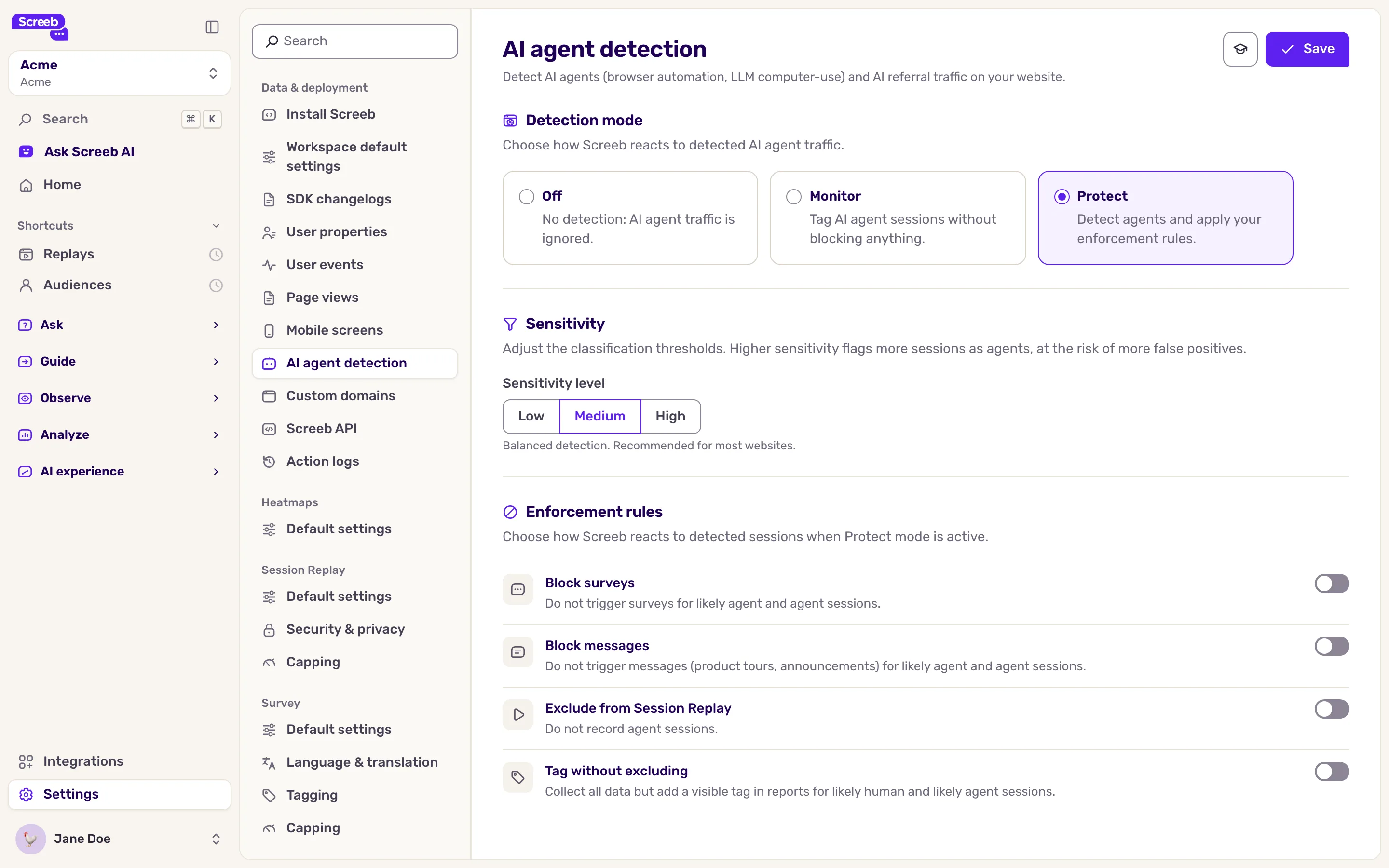
Start with Monitor for a week or two: you see how much agent traffic you get before blocking anything.
Choose the enforcement rules
Section titled “Choose the enforcement rules”The rules only apply in Protect mode:
| Rule | What it does |
|---|---|
| Block surveys | No survey shows to likely agent and agent sessions. |
| Block messages | No message or product tour shows to likely agent and agent sessions. |
| Exclude from Session Replay | Agent sessions are not recorded. Likely agent sessions still are. |
| Tag without excluding | Keeps all the data, and tags the likely human and likely agent sessions in your reports. |
The verdict comes back after the first page view of a session. That first page is never blocked, so a real visitor never loses a survey to a missing score.
Target and filter by AI classification
Section titled “Target and filter by AI classification”Once detection is on, the AI classification rule is available in the targeting of your surveys and messages, in recording scopes and in the session filters. Use it to show a survey to humans only, or to look at what agents do on your site. The classification also shows as a badge on sessions, user profiles and survey responses, except for humans.
Read the AI traffic report
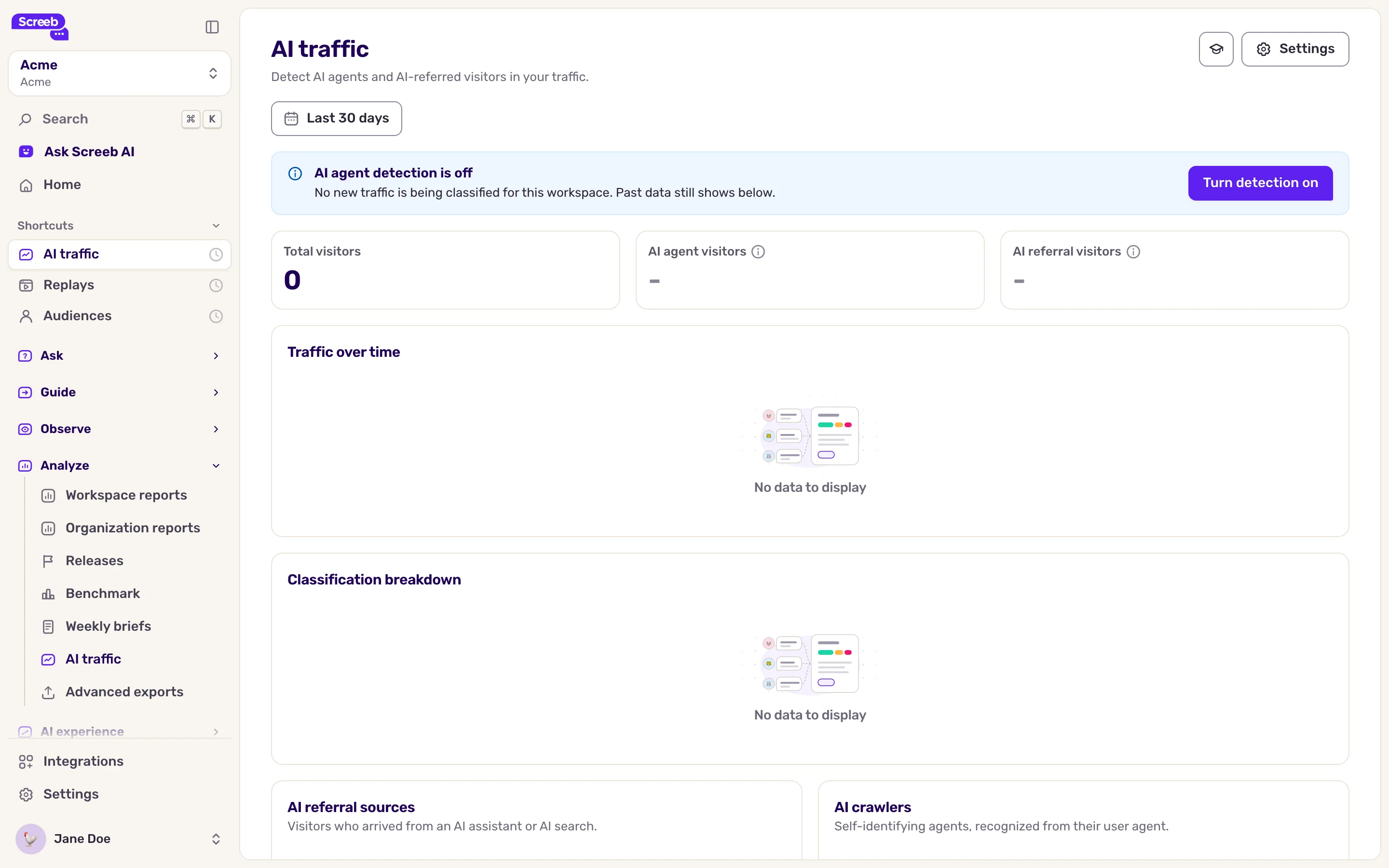
Section titled “Read the AI traffic report”In the main navigation, under Analyze, click AI traffic, then pick a period. The report shows:
- Total visitors, AI agent visitors (the share of likely agent and agent visitors) and AI referral visitors, each compared with the previous period;
- Traffic over time and the Classification breakdown across the four classes;
- AI referral sources: the AI assistants that send you visitors;
- AI crawlers: the agents that name themselves in their user agent;
- Pages visited by AI agents: where agent traffic lands, most visited first.
What you get
Section titled “What you get”Your surveys, messages and replays reflect real users, and you know how much of your traffic AI agents and AI assistants bring, and where it lands.
Troubleshooting
Section titled “Troubleshooting”The report shows AI agent detection is off. The mode is Off: nothing new is classified, and past data still shows. Pick another mode in the settings.
The AI classification rule is missing from the targeting. Detection is off for this workspace.
Too many real users are flagged as agents. Lower the sensitivity. It also reclassifies past sessions in the report and the filters, since classes are computed from the score with the current sensitivity.
Mobile sessions have no classification. Detection only runs in the JavaScript tag.