

Send survey data to Mixpanel
Send every survey display and answer to your Mixpanel project, to analyze feedback next to your product data.
With Mixpanel destination, Screeb sends an event to your Mixpanel project each time a survey is displayed and each time a question is answered. You can then analyze your survey results next to your product data in Mixpanel.
Before you start
Section titled “Before you start”- The Mixpanel integration is part of your plan. Otherwise, its card in the catalog shows Upgrade to install.
- You are an admin of the Screeb workspace: other roles cannot install or remove integrations.
- You have access to the settings of your Mixpanel project, to copy its project token and project ID.
Connect
Section titled “Connect”- In Mixpanel, open the settings of your project and copy the project token and the project ID. Note whether the project stores its data in the United States or in the European Union.
- In Screeb, open Integrations, find Mixpanel destination and click Install. The settings page opens.
- In Region, pick United States (US) or European Union (EU), to match the data residency of your Mixpanel project.
- Paste the token in Project token and the ID in Project ID.
- Click Install at the top right. Screeb starts sending events with the next survey displays. To change a value later, edit it and click Save.
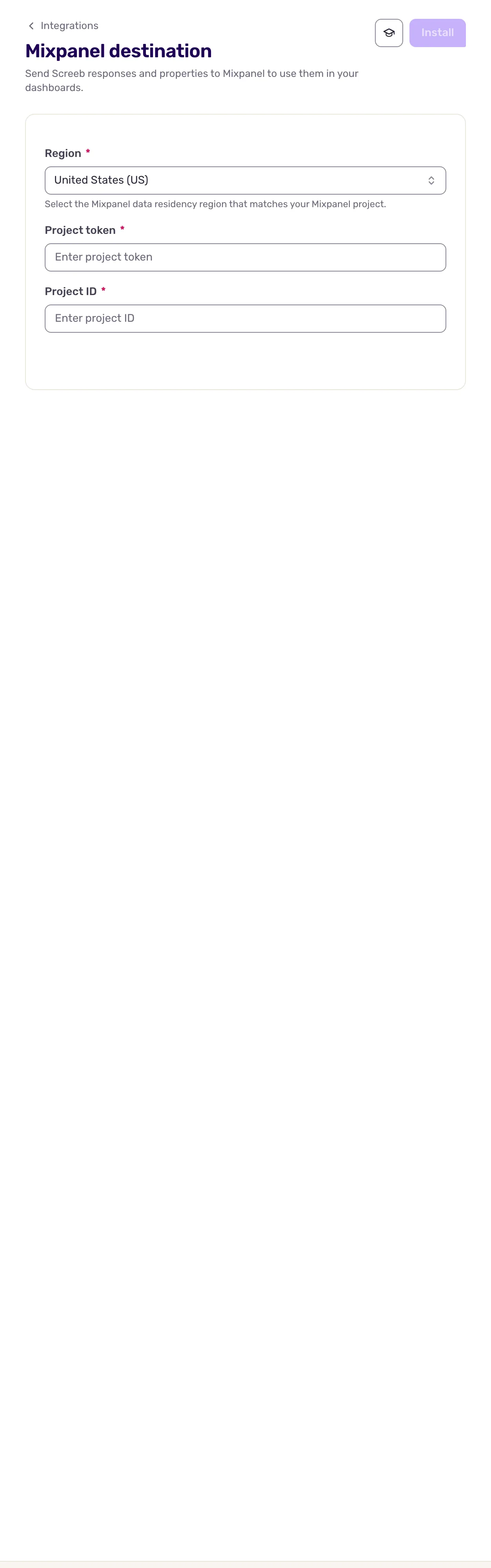
The region decides where Screeb sends the events: api.mixpanel.com for the United States, api-eu.mixpanel.com for the European Union. If no event shows up in Mixpanel, check the region first.
Data exchanged
Section titled “Data exchanged”Screeb sends events to the Mixpanel import API, for every survey of the workspace. In-app messages are not sent.
| Mixpanel event | When |
|---|---|
Survey seen |
A survey is displayed to a user. |
Survey question answered |
The user answers a question. |
Each event is attached to the Screeb user ID (Mixpanel distinct_id) and carries:
- the survey (ID and name), its channel and its version;
- the user (ID, and name, email and groups when known);
- the response (ID, language, date and tags);
- on
Survey question answered, every answer of the response so far: the question text, the values, the date and the tags; - the user properties and hidden fields of the response, and
context_*properties.
Nothing is read from Mixpanel by the destination.
Disconnect
Section titled “Disconnect”- Open the Mixpanel Destination settings.
- Click More at the top right, then Delete, and confirm with Delete integration. Screeb stops sending events and deletes the configuration. The events already sent stay in Mixpanel.