

What you can do with Screeb
See what Screeb does, from surveys and in-app messages to Session Replay and AI analysis, and where each feature sits in the admin.
Screeb helps product, UX and customer teams understand their users on the web and on mobile. You ask users questions at the right moment, guide them through your product, watch what they do and let AI turn it all into insights.
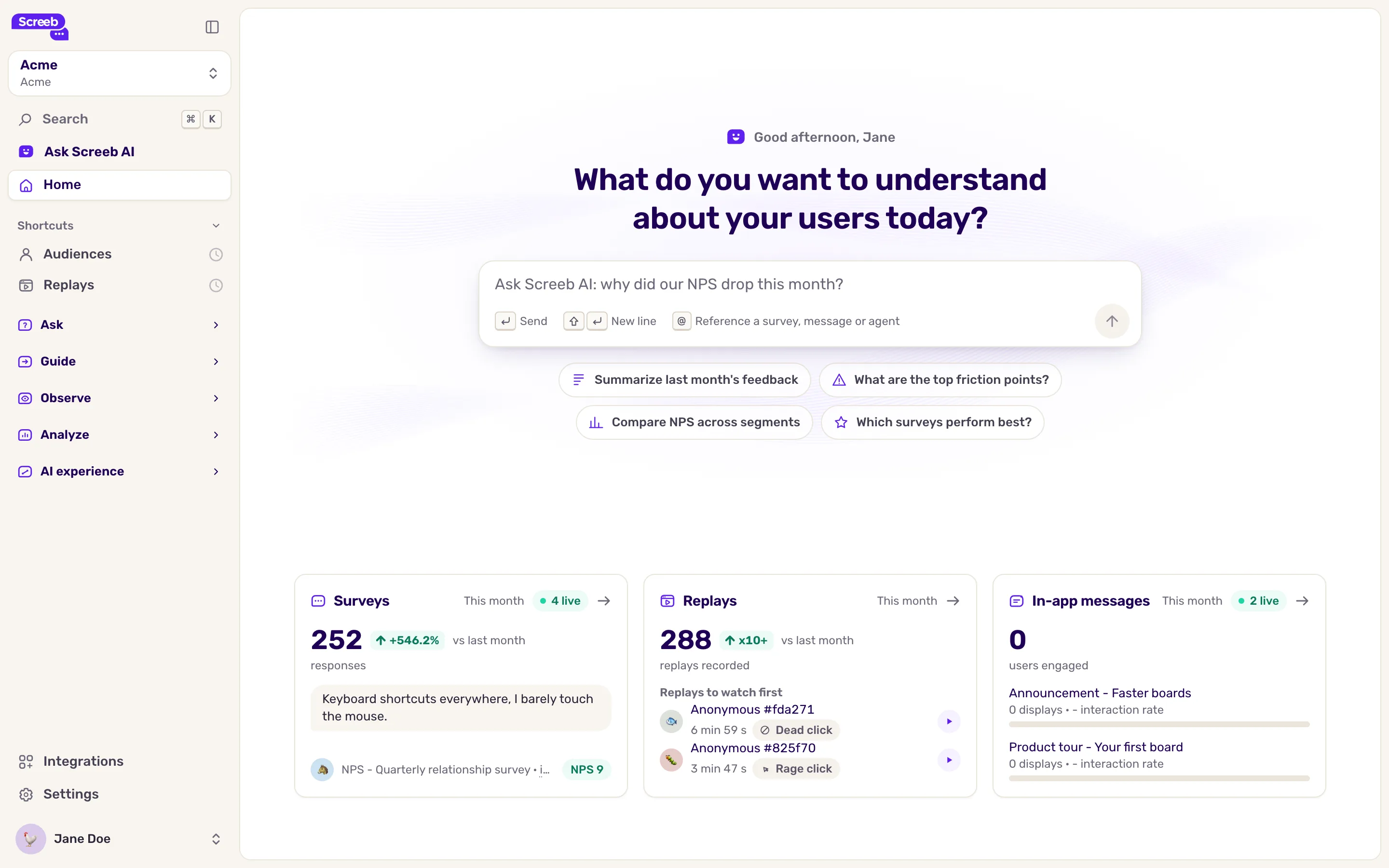
The admin sidebar groups the features by what you want to do. This page walks through each group.
Ask your users
Section titled “Ask your users”Under Ask:
- Surveys: collect feedback such as NPS, CSAT or CES, or ask any question. A survey can show inside your site or app, embed in a page, sit behind a feedback button, or go out by link or email.
- Survey templates: start a survey from a ready-made template.
Use it to measure satisfaction, validate an idea or recruit users for interviews and beta tests.
Guide your users
Section titled “Guide your users”Under Guide:
- In-app messages: show announcements and product tours in your site or app to drive feature adoption.
- Guide templates: start a message from a template.
Observe behavior
Section titled “Observe behavior”Under Observe:
- Audiences: your users, their properties and events, and the segments you build from them.
- Replays: replay what a user saw and did, with rage clicks, errors and responses marked on the timeline.
- Heatmaps (Beta): see where users click on each page.
- Funnels: follow users through key steps and find where they drop.
Analyze results
Section titled “Analyze results”Under Analyze:
- Workspace reports and Organization reports: dashboards for one workspace, or across all workspaces of your organization.
- Releases: record your releases and see how each one moves your metrics.
- Benchmark: compare your survey scores with other companies of your industry.
- Weekly briefs: send your teammates a weekly email of user insights, trends and recommendations.
- AI traffic: detect AI agents and AI-referred visitors in your traffic, see Detect AI agents and AI-referred visitors.
- Advanced exports: build CSV exports with the exact columns you need.
Use AI on your data
Section titled “Use AI on your data”Under AI experience:
- Topic analysis: what your users talk about in their responses, with the sentiment and trend of each topic.
Connect your tools
Section titled “Connect your tools”Integrations, at the bottom of the sidebar, connects Screeb to the rest of your stack: share responses in Slack or Teams, exchange data with Segment, Amplitude or Mixpanel, or call your own webhook.
Limits
Section titled “Limits”- The sidebar only shows the features of your plan and your role. Replays, Heatmaps and In-app messages depend on your plan.
- Benchmark, Weekly briefs and the AI experience section need AI to be on for your workspace.
- Most features need the Screeb SDK on your site or app. See Install Screeb on your website or web app.